Nikitu Power Point Template
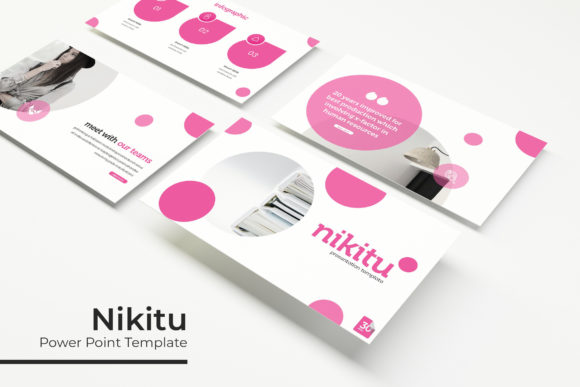
Transforming a standard presentation into a memorable visual narrative often hinges on the design assets you choose, and the Nikitu Power Point Template stands out as a comprehensive toolkit for professionals. This isn't just a single set of slides; it is a robust system built for versatility, offering over 150 total slides divided across five premade color schemes. With 30 unique slides dedicated to each color variation, you have the creative freedom to match any brand identity or mood without compromising on structure or flow.
A Foundation of Flexibility and Precision
One of the most significant advantages of this package is its focus on customization and ease of use. The template is built upon Master Slides, which ensures that your design remains consistent and easy to edit throughout the entire deck. You won't find yourself wrestling with misplaced elements or broken layouts. Instead, the pixel-perfect illustrations and resizable graphics allow for a polished, professional finish every time. The inclusion of drag-and-drop picture placeholders means that swapping out images is intuitive, saving you valuable time during the creation process.
Practical Design Elements for Modern Storytelling
Beyond the basic structure, the Nikitu template includes specialized slides that cater to specific needs. Whether you are compiling a portfolio to showcase your latest work or breaking down complex data, the design is equipped to handle it. Key features include:
- Handcrafted Infographics: Visualize data and processes with custom-designed charts and diagrams that are fully editable.
- Section Break Slides: Maintain a clean narrative flow by clearly demarcating different chapters of your presentation.
- Gallery and Portfolio Slides: Display high-quality visuals in layouts specifically designed to make your work the focal point.
The package is thoughtfully curated to ensure you have everything you need to start immediately. It includes five PPTX files in a widescreen format, a readme file for guidance, and links to download the free fonts used in the design. This attention to detail ensures that your final output looks exactly like the preview, maintaining that premium aesthetic from screen to screen.
Choosing the Right Template for Your Project
When selecting a template, it is essential to consider the visual hierarchy and how it aligns with your message. The right design asset should not only look good but also function as a silent communicator of your brand's professionalism. Think about the mood you want to set—whether it is corporate, creative, or educational—and select the color variation that best supports that tone. Because the graphics are editable, you can adapt the aesthetic to fit various contexts, from sleek business pitches to vibrant creative proposals.
Ultimately, investing in a high-quality template like this is about elevating your visual communication. It ensures that your content is supported by a structure that is both beautiful and functional, allowing your ideas to shine through without distraction. Note that all photographs used in previews are for illustration purposes only and are not included, allowing you to fully personalize the deck with your own imagery.